
OCAPPA Benchmarking Report
updated April 2024
 Each year, OCAPPA releases a report to summarize operations for the Ontario College sector. Each of the province’s 24 Colleges is responsible for submitting their report data in late summer. The data are then compiled, analyzed, reviewed and published into a report the following spring.
The report is used by Executives to monitor trends in the College sector. Facilities Leaders use the report to compare their institution’s indicators to prior years and against College peers to seek best practice opportunities.
Report Data Templates, Annual Reports and Companion Data files are available on our document repository site on SharePoint (hosted by Colleges Ontario). Visit the Become a Member section of our website to inquire about how Members can access this resource.
What is in the Report
The report is broken into 3 sections
- System Metrics – aggregated statistics for the College sector
- Cluster Comparisons – grouped measures comparing similar sized Colleges
- College Comparisons – key indicators ranking individual Colleges
Key metrics include:
- Trends in Total System Operating Costs
- College Space & Enrolment Growth
- Utility Trends
- Greenhouse Gas Emissions
The report is also accompanied by a companion data file that includes 5-years of detailed, historical data used to generate the report. It is made available to those interested in digging for deeper insights from the report.
Findings from the most recent report (Nov. 2025):

Executive Summary 2023/24
- 23 of 24 Colleges reported for the period between Apr. 1, 2023 and Mar. 31, 2024. Northern College data was unavailable and will be added to subsequent reports, when available. Calculated estimates were used for aggregated comparisons and will be updated upon receipt of their data.
FINDINGS
- Across all Colleges, space has remained similar to last year at 33M gross square feet.
- Overall Student WFU (weighted funding unit) enrolment increased 4.0%, to 238,676.
- The average College enrolment increased 4.0% last year. Large and Medium Colleges each experienced increases of 4.2%. Small Colleges saw a 2.5% increase
-
The total operating costs across the Ontario Colleges increased by $41.5M (12.9%) versus last year to $363M.
-
The $41.5M (12.9%) increase in system-wide operating costs was driven primarily by a $10.5M (12.4%) increase in Facilities Maintenance, a $9.2M (14.9%) increase in Cleaning and a $6.5M (9.3%) increase in Utilities & Waste.
-
These increases were slightly offset by a spending decrease in Other Operations of $0.1M (-1.8%).
-
Facilities Maintenance had the greatest single impact on the system-wide facilities costs, accounting for 26% of the total costs. Utilities & Waste expenditures followed at 21%.
-
- Overall utilities costs (excluding waste) increased by $5.2M (+7.9%) to $72M.
- Electricity represents 70% of total utility costs. Total costs for electricity increased by $4.5M (9.9%) versus last year. The +7.5% increase in consumption was coupled with an average increase in electricity rates of 2.2% to $0.13/kwh. Although the reduction in cooling degree days (CDD) indicates the cooling season was milder than the prior year, enrolment increases appear to have contributed to increased usage.
- Natural Gas expenditure decreased by 2.7% driven by a 7.1% average rate decrease to $0.39/m3. Although there were fewer heating days, increased enrolment appears to have contributed to higher heating consumption by 4.7%.
- Total Water expenditures have increased by $1.1M (+19.0%) since last year due to a +8.7% increase in consumption coupled with average rate increases of 9.5% to $4.59.
How to prepare the report data template
A new report template is used each year to collect data for each College. It contains improvements from previous files and adjustments for the upcoming report.
The Report Data Template file can be retrieved from SharePoint.
Steps
- Log into SharePoint,
- Select ‘Documents’ link on the left menu,
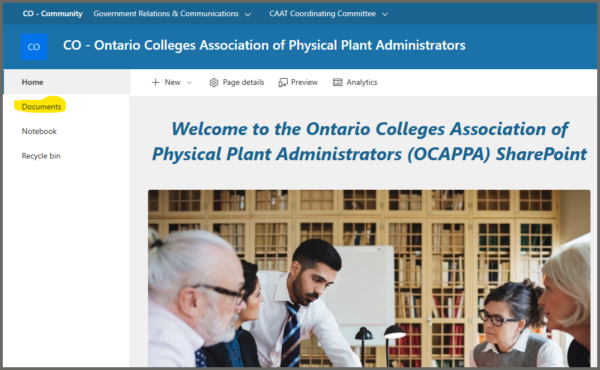
OCAPPA SharePoint site (2026)
- Navigate to ‘Resources/ Reports/ Benchmarking Report/’.
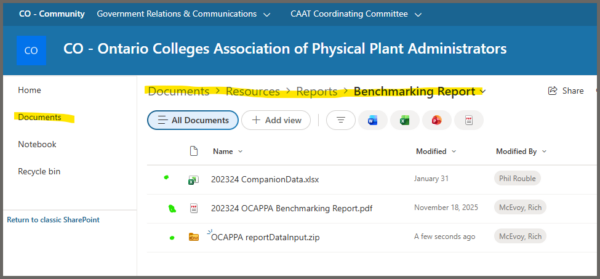
- Click the ‘OCAPPA Benchmarking Report Data Template’ file and save to your local drive.
- Uncompress the new file, open and follow the instructions to complete the forms.
- Once complete, return the file by clicking ‘Submit Via Email’ from the ‘Submit’ worksheet or, email directly to r_mcevoy@Fanshawec.ca.
Files are due each year by Aug. 31.